
There should have been another one above, but I foolishly didn’t buy enough brackets. 🙂
There should have been another one above, but I foolishly didn’t buy enough brackets. 🙂
Just finished putting making a nice birthday card for my grandmother.
Not sure if I’m willing to deface it with my horrible but well-wishing handwriting, though! Maybe on a post-it note?


SparkFun’s Peter Dokter has an interesting video talking about SPI and i2c comms. i2c in particular is a great bus mechanism, due to the microprocessor only needing TWO wires to control (almost) any number of devices.
Each device on an i2c network has a 7-bit address, so a single network theoretically supports up to 128 slave devices.In practice though, the limit is much lower. i2c slave chips often support only 8 different bus addresses, no more than 8 of that chip can be attached to the same i2c network. Others like the MPL3115A2 aren’t configurable at all! Some people really do want more than one altimeter…
You could have more than one chip to an address, it just means that the chips change in lockstep with each other, and any returned values are likely to be garbage. (being ANDed together by the open-drain bus)
Enter the i2c PCA9547 multiplexer. It allows you to have multiple i2c ‘channels’, and decide which one is active at any one time. That way, you could for instance have one MPL3115A2 altimeter on each channel, for a total of 8 in your system instead of just one. Ironically, the multiplexer suffers from the same address issues as the other chips; You can fit only 8 multiplexers on an i2c bus.
Or you can be sneaky… What’s the maximum number of uniquely controllable 1-address i2c devices you can put on a multiplexed i2c network?
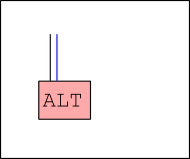
One bus, one device. Not much fun.

Let’s add a PCA9547 multiplexer! Now we have 8 switchable channels, and 8 individually controllable devices.
But we can do better.
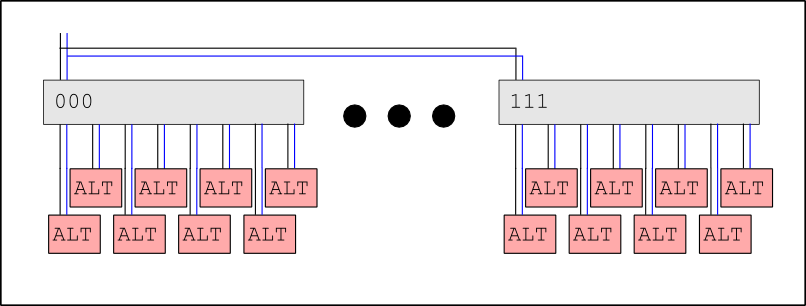 Each multiplexer can be given one of 8 addresses in the space 1110xxx. In shorthand, we’ll call them 000 to 111. So, we can attach up to 8 multiplexers to any one bus.
8 multiplexers × 8 channels = 64 devices, that each get a whole bus channel to themselves!
We can do better.
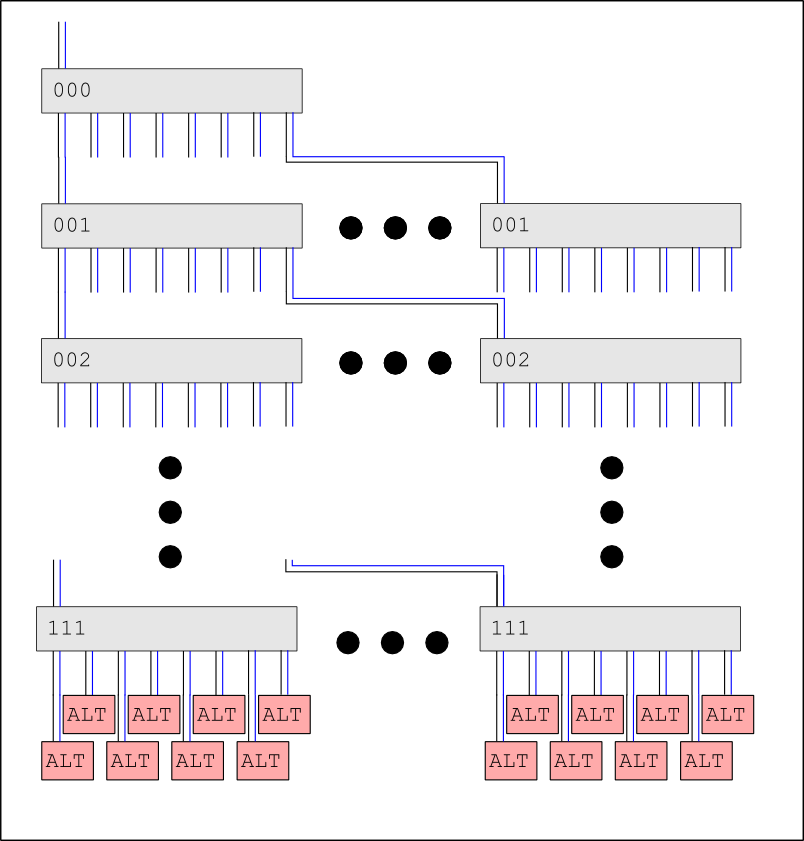
Not only can we attach multiple multiplexers to one bus, we can attach a multiplexer to another multiplexer. In this simple tree configuration, the controller is connected to a multiplexer with address 000. Each of 000‘s 8 channels is connected to a multiplexer with address 001. (For the same reason that we can have multiple devices with the same address if they’re not simultaneously connected, we can put same-address multiplexers on different channels.)
So, going down the tree, there are:
1 of 000
8 of 001
64 of 010
… and so on, down to;
16,777,216 of 111
And each 111 multiplexer has 8 channels, so we have 134,217,728 individually selectable bus segments, and can support that many single-address devices. Should be enough?
At this scale, we’d need 19 MILLION multiplexers, which not counting the net routing, the pull-up resistors, the power requirements, or the devices we’re supporting, would require (according to the package size) a circuit board with an area of more than 300 square metres.
We can do better!
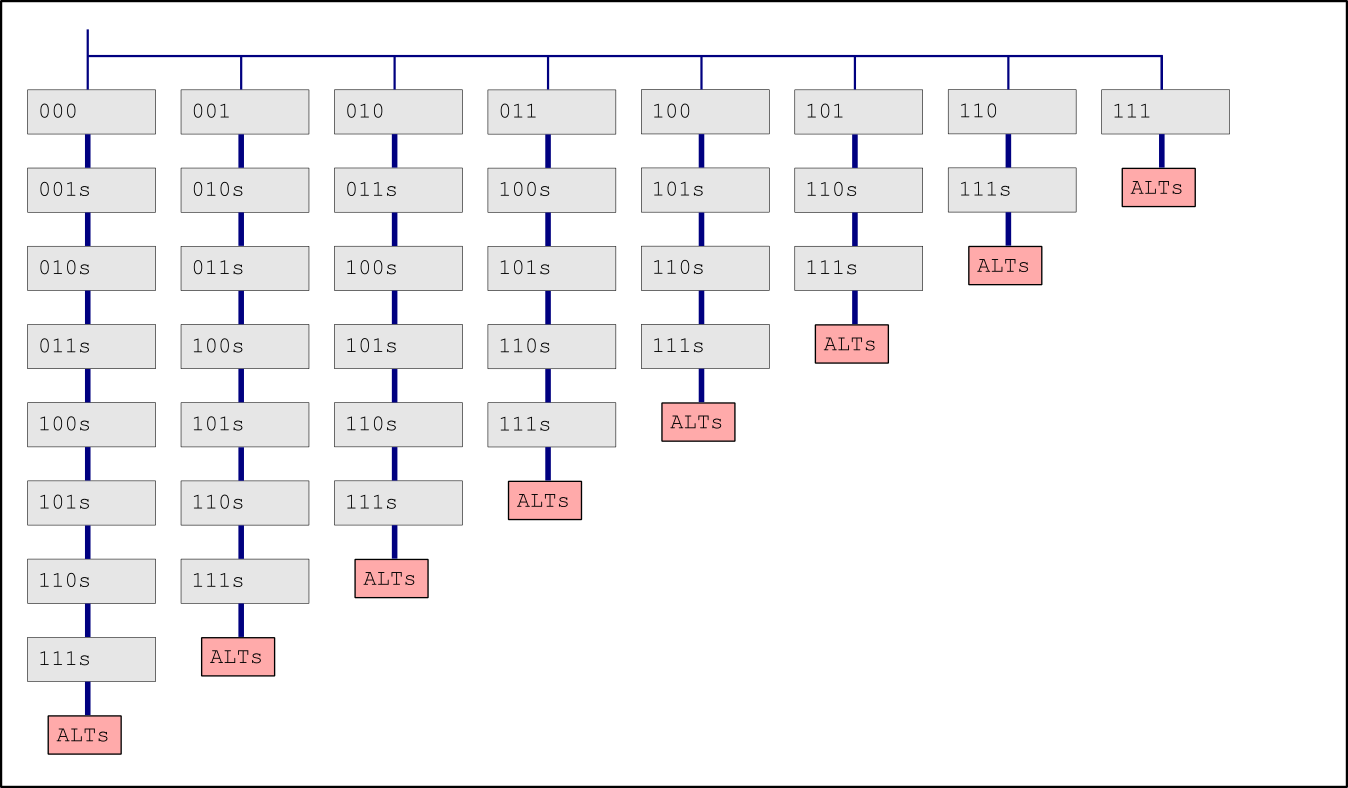 (It becomes unwieldy at this stage to try and draw even collapsed collections of multiplexers, so for the above, imagine that boxes with plural labels indicate multiple chips, and thick connections represent the 1:8 fan-out discussed previously.)
Reading the PCA9547 datasheet, it mentions that you can also disable the multiplexer entirely so that no channels are selected. This allows another fun technique. In the above diagram, the left-most column is the tree structure show in the previous step. The second column is a slightly smaller tree starting at 001, and so-on.
By disabling all top-level multiplexers, then only enabling the multiplexers needed, all of the devices in all the trees can be accessed. The diagram only shows the first generation of extra multiplexers, this process can be recursively applied to each sub-tree.
Eg to access a channel in multiplexer 101 → 3 → 1 → 7:
This adds 19 million extra devices on top of the 134 million we get from the simpler tree in the previous step. Now, that’s enough?
A few more can be added through further recursion, but there are diminishing returns.
Left as an exercise for the reader. What if you have multiple i2c multiplexers with the same address in sequence? If initially active, sending ‘disable’ would probably switch all of them off. And then sending ‘enable’ would activate only the first one…
Backbone.js has routes. Hooray, now ‘#here’ can go here, ‘#there’ can go there, and so on! That’s the logic side sorted out.
What about presentation?
In many cases, 1 route <=> 1 ‘page’ of content.
How do we do that?
The Bootstrap library has a tabs component that implements a couple of very useful things:
We still need to add two small things to connect any router to a set of pages:
All it needs is the following code:
//On click, show the page, allow to route.
$('#tab_demo_menu a').on('click', function (e) {
	$(this).tab('show');
}
//On route, trigger the 'click'
Backbone.history.on('route', function(router, event) {
	$('#tab_demo_menu a[href="#'+this.fragment+'"]').click();
});
So what does this mean?
Look! A finely crafted demo: https://mindbleach.com/demos/backbone_bootstrap_pages/
Ginger and her elbows:

(I think those are actually wrists, but anyway)
Puck motioning the waiter over:



64 bits fit neatly onto an 8×8 matrix of black/white squares. Those 64 bits, naively encoding latitude/longitude, will at *worst* locate any point on the planet to within 1cm.
Equatorial circumference: 40,075,017 m
Meridional circumference: 40,007,860 m
Assuming 32 bits per measurement;
Longitudinal precision: 40075017 m / (2^32) in cm = 0.9330692 centimetres
Latitudinal precision: 40007860/2 m / (2^32) in cm = 0.46575279 centimetres
We don’t even need that 64th bit; latitude will fit into 31.
If you want to physically encode that point onto a physical object/location, each of those square ‘bits’ can’t be larger than 1.25mm wide.
Smaller if you leave some space to write “YOU ARE HERE”
Installing ready-made web applications on your server is easy, and gets you up and running quickly. It also means you’re running the same code as thousands of other web servers, which presents a juicy target to malicious hackers; find one exploit and you have access to all those machines!
Several times now, my server’s been broken into by some automated exploit, through versions of Gallery and Dokuwiki that were a little out-of-date. (Mea culpa, but they were used infrequently) Each time the exploit script would modify my .htaccess or php files to direct users away to some dodgy gambling or attack-the-user website.
The first option would be to defend against an exploit being able to modify any of these files. Unfortunately the hosting provider runs PHP as me, so I couldn’t figure out how to prevent those files (also owned by me) being modified. These exploits seem to know how to use chmod.
A second option is to monitor for any changed files; I was only finding out about these attacks when Google added my site to their ‘naughty’ list.
It’s very simple:
find /home/mrtrick \( -name ".htaccess" -o -name "*.php" \) -a -mmin -10 -printf "%t %p\n" | mail -e -s "Mindbleach files modified" xxxxxx@xxxxx.com
Cron runs every 10 minutes. If any .htaccess or *.php file was modified since the last time it ran, send me an email with the files. The ‘-e’ option means I don’t receive blank messages.
Works well! I get an email listing legitimate changes every time I upgrade software, and if a file is modified at any other time I’ll see it immediately.
If the incrond daemon were installed on the server it’d be an even better option, as it can specifically watch for file activities.

Almost completed my DIY folding bed! Most folding beds are just wasted space and volume while folded up. Mine is cleverer than that; it’s a desk and shelf that transforms into a bed. As the bed folds down, the desk and shelf stay level, anything on them is undisturbed.

Working well so far, more info to come.
Okay, this has to be the coolest gadget I’ve seen all year. It’s called a ‘Hammer Tacker’, and it’s basically a stapler in hammer form. Need that report stapled? *BAM!* Co-worker left his desk unattended? … Lots of things could benefit from some indiscriminate hammer-stapling!
